
Customers who are registered with the Customer Hub can raise new Customer Service tickets in a variety of ways.
Customer Hub
The preferred method of raising new tickets with the Service Desk is through a form accessed via the “New Service Desk” tile on the Customer Hub (note: not the old “Service Desk” tile):
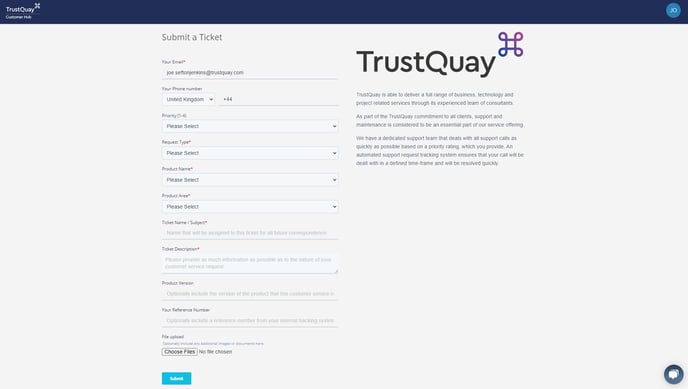
Please fill out the fields as follows:
- Email address - the email address of the person raising the ticket. Note that if you have cookies enabled, this field will be automatically populated when submitting subsequent tickets. If so and you want to raise a ticket on someone else's behalf, then please use the "Not you? Click here to reset" link at the top of the form to reset this field.
- Phone Number - as per Email address. Optionally provide a phone number if you want to be contacted about this ticket.
- Priority (1 - 4) - the priority assigned to the ticket according to the following guidelines:
- 1 - Urgent: A serious problem that prevents production processing.
- 2 - High: A serious problem affecting but not preventing production processing.
- 3 - Medium: A medium priority problem affecting but not preventing production processing. A serious problem affecting but not preventing test processing.
- 4 - Low: A minor or cosmetic problem affecting but not preventing production processing. A medium or minor priority problem affecting but not preventing test processing.
- Request Type - the type of request for the ticket, to assist with routing:
- Enquiry - general enquiries about TrustQuay products and services, including "how-to" style questions.
- Defect - suspected fault with one of TrustQuay's products.
- Enhancement Request - suggestions for improvements to one of TrustQuay's products.
- Professional Services Request - enquiries or requests for engagement with TrustQuay's professional services team for project based activities such as consulting, installations, upgrades, data migrations and project management.
- Commercial Request - enquiries about licensing additional users, modules and products from TrustQuay.
- License Key Request - request for temporary license keys to unlock one of TrustQuay's products.
- Issue Severity (only for "Defects"):
- Severity 1 - Major fault, key functionality unavailable with no workarounds.
- Severity 2 - Major fault, affecting key functionality somewhat mitigated by workarounds.
- Severity 3 - Moderate fault affecting non-key functionality or major fault affecting key functionality but with sufficient workarounds in place.
- Severity 4 - Minor fault affecting non-key functionality or moderate fault with sufficient workarounds in place.
- Professional Services Request Type (only for "Professional Services Requests"):
- New Project - initiate an entirely new project with TrustQuay.
- Consultancy - relating to an existing consulting engagement.
- Bespoke Development - request for customised development on one of TrustQuay's products.
- Upgrade - relating to an existing upgrade project.
- Training - request for product training from TrustQuay.
- Installation - relating to an existing installation project.
- Other - any other request from the TrustQuay professional services team.
- Product Name - the name of the TrustQuay product that the ticket relates to.
- Product Area - the area of the TrustQuay product that the ticket relates to.
- Ticket Name / Subject - the short name that you want to assign to the ticket.
- Ticket Description - a detailed description of the issue/request, including steps to reproduce if necessary.
- Product Version - further details of the specific version of the TrustQuay product that the ticket relates to.
- Your Reference Number - any internal reference number that you want to include on the ticket to allow for cross-referencing to your internal ticketing system.
- File Upload - any files that you want to include with the ticket.
If the Customer Hub is not accessible for any reason, please email the Customer Service team directly at the following email address – support@trustquay.com